Monday, 23 January 2012

Nokia Lumia 710 Highlights


Nokia is coming with good handsets and nokia lumia 710 is a good one.

FEATURES SUMMARYBLUETOOTH SUPPORTUSB SUPPORT:
microUSB v2.0DIGITAL CAMERA:
5 MP, 2592Ñ…1944 pixels, autofocus, LED flash, geo-tagging, face detection, video (720p@30fps)TOUCHSCREENWLAN/WIFI SUPPORT:
Wi-Fi 802.11 b/g/n
STATUSComing soon
FORM FACTORBlock
NETWORKS2G: GSM 900 / GSM 1800 / GSM 1900 / GSM 850
3G: HSDPA 1900 / HSDPA 2100 / HSDPA 900
BATTERYLi-Ion, 1300 mAh


Nokia Lumia 710 Technical Specifications


General
StatusComing soon
AnnouncedOctober 2011
Network (2G)GSM 900 / GSM 1800 / GSM 1900 / GSM 850
Network (3G)HSDPA 1900 / HSDPA 2100 / HSDPA 900
Form factorBlock
Antenna typeInternal
Size
Weight125.5 g (with battery)
Dimensions119.0 x 62.4 x 12.5 mm
Display
TypeGraphical
ColouredYes, TFT capacitive touchscreen, 16M colors
Size3.70 inch
Resolution480 x 800 pixels
- Nokia ClearBlack display
- Multi-touch input method
- Proximity sensor for auto turn-off
- Accelerometer sensor for UI auto-rotate
Memory
Shared memory8 GB
- Photocall
- 512 MB RAM
- 1.4 GHz processor, Qualcomm MSM8255 chipset, 3D Graphics HW Accelerator
Ringtones
Polyphonic ringtonesYes
Ringtone profilesYes
- MP3, WAV ringtones
Networking
GPRSYes, Class 33
EDGEYes, Class 33
WLANYes, Wi-Fi 802.11 b/g/n
USBYes, microUSB v2.0
BluetoothYes, 2.1 with A2DP, EDR
WAPYes
BrowserYes, WAP 2.0/xHTML, HTML5, RSS feeds
Email clientYes
- Microsoft Windows Phone 7.5 Mango
- HSDPA 14.4 Mbps, HSUPA 5.76 Mbps
- GPS with A-GPS support
- Digital compass
- Push Email
- Instant Messaging
Features
VibrationYes
SMSSend / Receive
MMSSend / Receive
CameraBuiltin, 5 MP, 2592Ñ…1944 pixels, autofocus, LED flash, geo-tagging, face detection, video (720p@30fps)
JavaYes, MIDP 2.1
GamesYes, (changeable)
ClockYes
AlarmYes
CalculatorYes
CalendarYes
To-do listYes
Voice dialingYes
Voice memoYes
T9Yes
Multiple numbers / contactYes
HandsfreeYes
Headset jackYes
FM RadioYes
- MicroSIM card support only
- SNS integration
- Active noise cancellation with dedicated mic
- MP3/WAV/eAAC+/WMA player
- MP4/H.264/H.263/WMV player
- Document viewer
- Video/photo editor
Standard Battery
TypeLi-Ion
Amperage1300 mAh
Standby timeGSM: 400h / 3G: 400h
Talk timeGSM: 6h 50m / 3G: 7h 40m


Sunday, 22 January 2012

How To Open .DLL Files


Causes of .DLL File Errors
Missing software and file associations are the most common cause DLL file problems. It is highly recommended that you scan your PC using the DLL File Repair Tool. It will analyze your files and determine if there are errors that are causing you to have DLL file problems.
Common Symptoms
DLL file error symptoms can include the inability to open DLL files, program lock-ups, crashes, slow PC performance, startup and shut down problems, and installation errors.
Fixing the Problem
Fixing the problem can be as easy as a couple clicks, first download and run the DLL File Repair Tool. Simply click the link below to download the software.

1. Run the Registry Reviver setup installer
A window will open asking do you want to run or save this file? You might see a confirmation message asking if your sure you want to run this software,
click 'Run' again.

2. Follow the Registry Reviver setup wizard
When the download has finished the Registry Reviver setup wizard will appear and guide you through the rest of the installation.

3. Launch Registry Reviver and run a PC Scan.
After the installation is complete, you can open Registry Reviver at any time by double clicking the icon on your desktop.

Once your application is open, you can start scanning for PC system errors right away.

Spyware Doctor With AntiVirus

Spyware Doctor With AntiVirus
Spyware Doctor With AntiVirus Is A Killer! Once you run the installer it will download a small update of virus, malware, and spyware definitions… After the install is done, the malware scanner will start scanning the selected drives. This is a quick and painless process and should not take any longer than 5 minutes. All malware detected will be displayed and you will be given the option to handle this. Once you obtain a registration key, simply enter it in and remove all of the malware/viruses that were found.

A great feature of Spyware Doctor’s Antivirus is that it can be fully functional (install and scan) when running Windows in safe-mode, which most PC security tools cannot offer. This can come in VERY HANDY when your computer is infected with malware which interrupts Windows from booting up properly.
Got Malware? Not A Problem For This Malware Removal Tool
When testing out new anti-malware software, we like to infect our machines as much as possible with recent malware and spyware just to see how good the software really is… But before we do that, we always run it on a clean PC.

Spyware Doctor with Antivirus finished its first scan in about 45 minutes and finished its second scan it just over half an hour. This is typical for many scanners once an initial scan has been performed. What’s so great about this malware removal tool is that it takes full advantage of your PC’s idle time and can ramp up its scans. If your computer is running low on power or using a lot of its resources, the scanner will slow itself down and not cause any interruptions.

Finished Scan. Detected Malware… Now What?
When the scan is finished, Spyware Doctor will list everything that it detected. You’ll be able to see what the threat level is, if there is a registry error associated with it, and you’ll still be able to access all of this once you quarantine the infected files. The common user will just select “cleanup”, but some of us geeks like to keep that information handy.


PC Tools really did an amazing job this time around. After we flooded our test PC with malware, Spyware Doctor with Antivirus managed to not only to detect all of the malware, but it was able to remove 100% of the malware detected. Now that’s what we like to see!
Overall, Spyware Doctor with Antivirus GETS OUR #1 RANKING for best malware removal and scanner. Simply put… This software rocks!

DriverMax - Save and restore drivers in a move Free Download

Driver Max is an application that can make a backup of all the drivers installed on your computer and can also restore. It can generate reports and make your account if you update your drivers easily.
Max driver functions are useful:

display drivers installed;
Making a safety for all drivers;
restoration of backup drivers;
saving list of installed dirverele (html / text);
Update drivers to the latest version;
providing details about installed components;


identify unknown components;
view statistics about the popularity of certain components;
The interface is customizable and functions are grouped into categories. Driver Options The functions have access to backup and restore and need not be registered / to your account to use. Also heading nor Popular Hardware need not register. In return for updates (update) account is required.
Backup


can be done in a directory or in an archive, only the drivers selected from the list (just a few or all). Restoration can also be made ​​for the drivers you select from the list. Spare time to re-install your operating system.

Any Video Converter Ultimate for windows

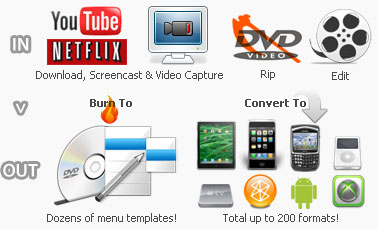
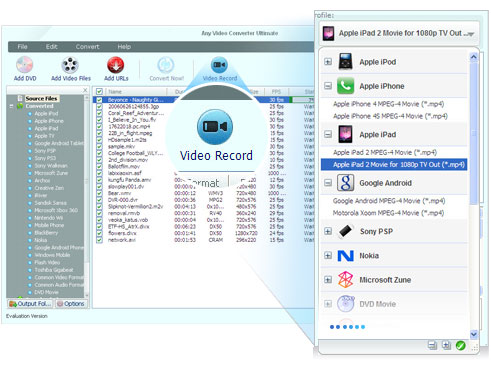
Convert all kinds of video formats, including MOV, M2TS, OGM, RMVB, RM, WMV, QT, FLV, MOD, TS, TP, DVR-MS, Divx, etc. to AVI, WMV, MP4, MPEG-1, MPEG-2, FLV, SWF, MKV, 3GP and 3G2 for all kinds of portable media players including iPod, iPhone, PSP, Amazon Kindle Fired, Samsung Galaxy S II, android mobile phones including Google Nexus One, BlackBerry and Nokia and game consoles including PS3, Xbox360 and Wii.


  • Capture & record video from Netflix and similar feed sites.
  • Download YouTube videos with file queuing down-loader.
  • Rip DVD & convert videos to handheld & mobile devices.
  • Seamless transfer video to DVD Burner to create DVDs.
  • Edit video clips with cut, crop, and special effects.


Features and Benifits
  • Screen-cast anything you see on screen.
  • Record video and capture desktop activities.
  • Rip DVD files and DVD folders to hard disk.
  • Support converting to iPhone, iPad, Android Phones, Samsung Galaxy S II, Amazon Kindle Fire and more.
  • Extract DVD to file formats readable by media players.
  • Compatible with all DVD folder structures.
  • Convert any video formats for various devices.
  • Download YouTube video with a few clicks.
  • Burn (write) videos to DVD with dvd authoring tools.
  • Make a DVD menu with DVD menu templates.
  • Create personalized videos easily with video clip, video crop, effects setting functions.
  • Intuitive interface and fast conversion speed with CUDA Technology.


Thursday, 12 January 2012

Twitter Now Streaming Tweets From Artists With Verified Accounts to Music & Video Apps

Twitter has become an important medium for artists and consumers of multimedia alike. Twitter has recently partnered with an online service that mines data from the Twitter stream for relevant information and updates on artists for use on mobile apps.


Twitter has announced partnerships with three music-data services, namely The Echo Nest, Gracenote and Rovi, for the distribution of tweets from popular artists. With the new service, Twitter account data, tweets and mentions from of musicians with verified Twitter accounts can now appear on music apps running on iOS, Android and other platforms.

One particular partner, Echo Nest, will use its Rosetta Stone service to retrieve tweets and other data from Twitter, which will then be integrated with apps like Spotify Radio, Nokia, Rdio, MOG, EMI andiHeartRadio. With the service, listeners can receive Twitter updates from artists while they listen to said artists’ songs on their smartphones, tablets or web browsers.

Meanwhile, Gracenote, which provides music data to iTunes, HTC smartphones, Ford SYNC and Sony Bravia TV sets, will likewise be integrating tweets from artists, so that listeners and viewers will also be able to get these updates as they watch shows or listen to music. Twitter plans to let more companies access its API, so that artist tweets can reach a wider audience. Of course, the only limitation here is that artists will need to have a verified account in the first place.

To date, one app is already running the service, particularly the Discovr Music for iOS (pictured above), which now pulls in tweets from artists, and displays tweets mentioning said artists, whenever their songs are played.

Nokia PC Suite 3.2 Free Download (Beta)

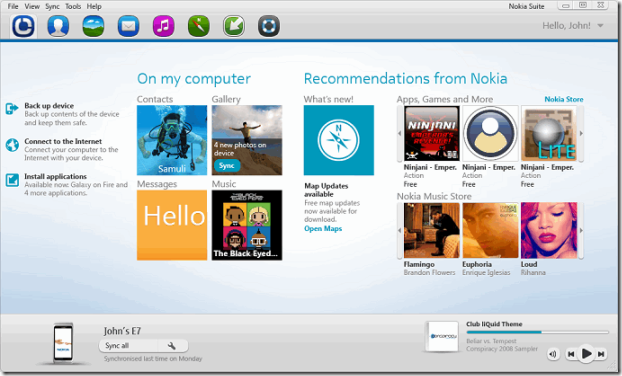
Nokia is my favorite brand in mobile telecommunication and recently released the Beta version for their new Nokia Suite 3.2 with improved speed and better graphics. You can check the below screenshot of the UI of this new Nokia Suite 3.2
So now your phone software update process is more reliable and more stable that means now it does not disconnect while update is going on. So its officially by Nokia and you can download it directly from below link.


How To Access Gmail Offline|Create Shortcut For Offline Gmai...


To be able to access Gmail account offline, you’ll need to first download and instal Google Gears. If you’re using Google’s Chrome browser, though, you can relax since Chrome comes with Gears installed by default.
So i Personally say that you used google chrome if you want to access offline gmail in good way...


How To Create Shortcut For Offline Gmail

1)) go to Settings->Labs and enable the Offline feature.
2))Gmail should now reload and you will see a new link titled “Offline“ right next to the “Settings“ link in the top right corner of the Gmail window.

3))Click on Offline and Google Gears will throw a warning at you that some website named http://mail.google.com/ trying to access Gears. Since I was quite sure that it’d harmless, I let the website access Gears and you should probably do the same.now begin downloading what it thinks are the most important emails to you. I’m saying “what it thinks” because the Gmail team has a pretty nifty algorithm to determine the emails that it downloads. For me that figure came to “about 4 years” worth of my emails and you might get a different figure, depending on the amount of email that you get.

At any rate, Gears will download about 10000 of your latest emails, not counting the Trash and Spam folder so this should be enough for most of us.

Depending on the speed of your link, this actual process of downloading and syncing emails might take a while...
4))Gears will also offer to create a shortcut for Gmail on the desktop. With this shortcut, you can login Gmail in offline mode right from your desktop.

The Offline Gmail feature also includes a very cool Flaky Connection Mode. In this mode, you can continue using Gmail as you normally would and Gmail will automatically determine if you are online or offline, without the user ever knowing about it.

If you send any emails in this mode and you’re offline, Gmail will keep them in the outbox and send them as soon as you come back online, and you’ll never even come to know about your connection status. In my opinion, you should always keep this option checked. To enable the flaky connection mode, click on the Offline Gmail icon next to the Settings link.

iPhone 5 Pictures Leaked

Whole World is waiting for iPhone 5. Nobody knows how it looks, but we are trying to get first look of iPhone 5. So here is some pictures....


Related Posts Plugin for WordPress, Blogger... TwitterFacebookGoogle PlusLinkedInRSS FeedEmail Delicious Digg Stumbleupon Favorites More

Share

TwitterFacebookGoogle PlusLinkedInRSS FeedEmail Delicious Digg Stumbleupon Favorites More